![measurable-energy-logo-light-purple-help.svg]](https://support.measurable.energy/hubfs/Logos/measurable-energy-logo-light-purple-help.svg)
Away for the Day and Is Active are two optional features that adjust your socket's on/off schedule to match how you actually use your desk. Away for the Day saves energy by switching your socket off when you haven't come in. Is Active stops your socket switching off while you're still working.
Both features work on top of your normal schedule; they never change it. Each one is switched on or off separately for each product. They only act on weekdays (Monday to Friday).
Away for the Day
Away for the Day switches your product off if nobody has used it in the 2 hours after it turned on. If your schedule turns the socket on at 08:00, the check runs at 10:00.
At the check, each socket that is switched on and has something plugged in is looked at:
-
A socket counts as in use if it is drawing more than 5 W right now, or was drawing more than 5 W for over 10% of the last 2 hours.
-
If we have no recent readings for a socket, we treat it as in use, so a data gap never switches you off.
The product is switched off only if enough of its sockets are idle:
| Sockets present in product | Idle sockets needed for Away for the Day to activate |
| 1 | 1 |
| 2 or 3 | 2 |
| 4 | 3 |
When it switches off, the product stays off until your next scheduled off-time, usually the evening. From then on your normal schedule takes over again, so it switches on as usual the next morning.
The check is skipped if there are fewer than 2 hours between the check and your next scheduled off-time.
IsActive
IsActive keeps your product on for about another hour if you're still using it when your schedule is about to switch it off. If your schedule turns the socket off at 18:00, the check runs at 17:58.
At the check, each socket that is switched on and has something plugged in is looked at. A socket counts as in use if it is drawing more than 5 W at that moment. If we can't read a socket, we treat it as idle.
The product is kept on if enough of its sockets are in use:
| Sockets present in product | Sockets in use needed for IsActive to activate |
| 1 to 3 | 1 |
| 4 | 2 |
When it keeps the product on, it does so for 62 minutes. Just before that time runs out, it checks again. A product can be kept on at most 3 times in a row, so about 3 hours past your scheduled off-time at the most. After that, it switches off as normal.
Getting power back
If Away for the Day has switched your product off and you arrive, press any button on the product. The whole product switches back on and stays on until your next scheduled off-time. You don't need to press a button on each socket.
If you do nothing, the product stays off until your next scheduled off-time. After that it follows your normal schedule, so it comes on as usual on the next working morning.
Is Active only ever keeps power on, so there is nothing to undo. If you want the product off sooner, switch it off with its buttons as you normally would.
How they fit togther
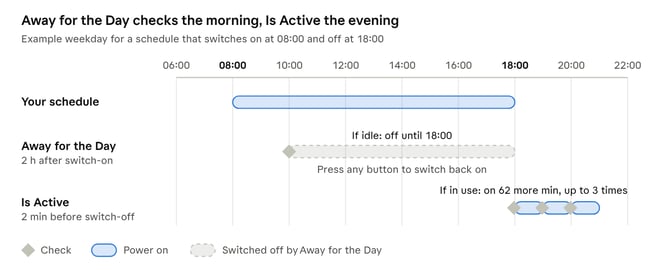
Away for the Day checks 2 hours after each scheduled switch-on, which for most people is once a day, in the morning. IsActive checks 2 minutes before each scheduled switch-off. Neither runs at weekends.
If Away for the Day has switched your product off, IsActive has nothing to keep on that evening. If you switched it back on with a button, IsActive checks at your off-time as usual.
Frequently Asked Questions
Will these features change my schedule?
No. They make one-off changes for that day only. Your saved schedule stays the same.
Do they work at weekends?
No. Both features only run Monday to Friday.
My monitor is on standby. Does that count as in use?
Usually not. Most devices on standby draw less than 5 W, so a socket with only standby devices counts as idle.
Something must stay on all day, like a fridge or a server. What should I do?
Turn off Away for the Day for that product. Otherwise it may switch the product off if the other sockets are idle.
I came in late and my desk had no power. Why?
Nobody used the desk in the 2 hours after it switched on, so Away for the Day switched it off. Press any button on the product to switch it back on for the rest of the day.
My desk switched off while I was still working. Why?
Is Active may be turned off for that product, or your devices drew less than 5 W at the check. It also stops after keeping the product on 3 times in a row. Press a button to switch it back on.
Do Is Active and Away for the Day work together?
Yes. If you switch your product back on after Away for the Day, Is Active still checks at your evening off-time as usual.